
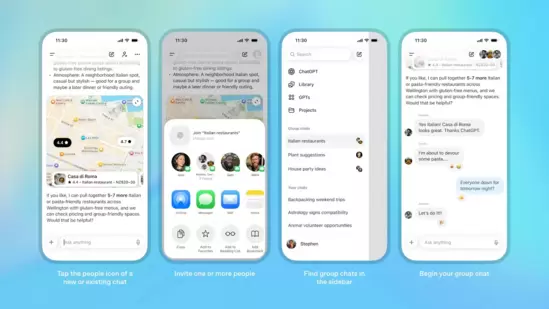
OpenAI has officially rolled out Group Chats, one of the most anticipated features for ChatGPT and its first true multi-user collaborative experience. The new addition allows groups of users to interact together inside a single conversation with ChatGPT participating only when needed effectively transforming the chatbot into something closer to a social messaging platform than a one-to-one assistant.
This is the latest indicator that OpenAI is pushing ChatGPT far beyond its original role as an AI text generator, evolving it into a full-fledged productivity and communication ecosystem.
A Feature Leaked Only Days Ago Is Now Live
Just 48 hours before the launch, early screenshots leaked online showing a hidden “Group Chat” menu inside the ChatGPT interface. That fuelled speculation that OpenAI was preparing a social-layer upgrade.
OpenAI has now confirmed the rollout publicly. For now, the feature is available in only four regions Japan, New Zealand, South Korea, and Taiwan as part of an early testing phase before a global release.
This marks one of the fastest leak-to-release feature cycles in OpenAI’s history, suggesting the company is accelerating product deployment ahead of competition from Meta, Google, and Anthropic.
What Exactly Are ChatGPT Group Chats?
At its core, the feature allows users to:
-
Create a multi-person chat room, similar to WhatsApp or Telegram.
-
Invite up to 20 participants.
-
Allow ChatGPT to join the conversation as a participant when needed.
-
Collaborate on shared tasks planning, scheduling, brainstorming, research, or decision-making.
This makes ChatGPT a shared AI workspace rather than a private AI assistant.
OpenAI describes Group Chats as a way to bring “friends, family, or coworkers into a shared space to plan, make decisions, or work through ideas together.”
How to Start a Group Chat in ChatGPT
The process is intentionally simple:
-
Open ChatGPT and tap the People icon at the top-right corner of the screen.
-
Click the option to Create Group.
-
Generate a unique invite URL, similar to WhatsApp invitation links.
-
Share the link with others all participants must log into ChatGPT to join.
Every user must set up a visible profile:
-
Name
-
Username
-
Profile photo
This ensures transparency about who is speaking a critical feature for group conversations involving an AI participant.
Groups can have up to twenty members, with support for cross-device syncing.
ChatGPT Behaves Differently in Groups With “Social Intelligence” Built In
To prevent chaos in multi-user settings, OpenAI has redefined ChatGPT’s behaviour for group chats.
ChatGPT will now:
🔹 Speak only when appropriate
It will avoid interrupting or dominating discussions, stepping in only when invited or when its assistance is clearly useful.
🔹 Respond when @mentioned
Typing @ChatGPT prompts an instant response tailored to the conversation thread.
🔹 Read context across multiple speakers
The model identifies who said what and how the discussion is evolving.
🔹 Use emoji reactions
ChatGPT can now react with emojis a first for the platform aligning it with modern messaging app norms.
🔹 Track shared goals
Whether it’s group trip planning, team brainstorming, or study group sessions, ChatGPT keeps track of tasks and offers suggestions.
This marks a step toward making AI a social participant, not just a tool.
Powered by GPT-5.1 Auto: Dynamic Model Selection
OpenAI confirmed that Group Chats run on GPT-5.1 Auto, a system that automatically selects the most suitable model depending on:
-
The complexity of the prompt
-
The group’s use case
-
The user’s subscription tier (Free, Go, Plus, Pro)
This ensures a balance between speed and intelligence while controlling resource costs for the company.
Why This Feature Matters: The Bigger Picture
Group Chats are more than a convenience feature they are a strategic shift.
1. AI Enters Social Collaboration
Traditional AI tools focus on 1:1 interactions. ChatGPT now moves into the space of teamwork and group productivity, competing directly with tools like:
-
Slack AI
-
Google Workspace AI
-
Notion AI
-
Microsoft Copilot
2. ChatGPT Becomes a “Shared Brain” for Teams
Instead of individuals using ChatGPT separately, groups can brainstorm, debate, analyse documents, or co-create with AI in real time.
3. OpenAI Takes a Step Toward an “Everything App”
Following Sora (AI video generator), memory features, and marketplaces, Group Chats pushes ChatGPT further into the center of users’ digital lives messaging, planning, collaboration, and creation.
4. Potential for Classrooms, Work Teams & Families
Use-cases include:
-
Project teams collaborating
-
Classroom study groups
-
Families planning trips
-
Startups using AI for brainstorming sessions
-
Support groups using AI for shared guidance
Why the Limited Rollout?
OpenAI says the feature is launching first in Japan, Taiwan, South Korea, and New Zealand because these markets have:
-
High AI adoption rates
-
Strong early tester communities
-
Stable regulatory environments
-
Lower risk of misuse or misinformation spikes
Global expansion is expected after initial feedback.
Rollout Timeline
-
Live now: Japan, New Zealand, South Korea, Taiwan
-
Expected next: Europe & North America
-
Full global rollout: Likely over the next 2–6 weeks
Premium users (Plus/Pro) may get it earlier.
Conclusion: A Major Shift in How People Will Use ChatGPT
Group Chats officially marks the moment when ChatGPT transitions from a solo AI assistant to a collaborative, multi-human + AI platform.
It opens the door to:
-
AI-assisted meetings
-
Shared research environments
-
Classroom collaborations
-
Family planning groups
-
AI-enabled workspaces
It also positions OpenAI to challenge established messaging platforms like WhatsApp and Slack beginning with collaboration before expanding into communication.
